---
title: Connect your social media - Facebook
description: Here is the step-by-step process to connect a Facebook source to the Dashboard.
---
[Skip to content](https://help.bodyguard.ai/connect-facebook#main-content)
- [English](https://help.bodyguard.ai/connect-facebook)
- [Français](https://help.bodyguard.ai/fr/connecte-facebook)
English
Show submenu for translations
[](https://help.bodyguard.ai/fr/knowledge?hsLang=en)
- [Visit Bodyguard.ai](https://www.bodyguard.ai/en)
Open main navigation
Close main navigation
- [Visit Bodyguard.ai](https://www.bodyguard.ai/en)
- - [English](https://help.bodyguard.ai/connect-facebook)
- [Français](https://help.bodyguard.ai/fr/connecte-facebook)
English
Show submenu for translations
- [Contact us](mailto:help@bodyguard.ai)
[Contact us](mailto:help@bodyguard.ai)
How can we help you?
- There are no suggestions because the search field is empty.
1. [Help Center](https://help.bodyguard.ai/?hsLang=en)
2. [Connect to Bodyguard](https://help.bodyguard.ai/connect-to-bodyguard?hsLang=en)
3. [Connect your social media](https://help.bodyguard.ai/connect-to-bodyguard?hsLang=en#connect-your-social-media)
# Connect your social media - Facebook
## Here is the step-by-step process to connect a Facebook source to the Dashboard.
### 
Here are the different steps to connect a Facebook page. The Facebook connection funnel starts at step 3:
1. [Source management](https://help.bodyguard.ai/connect-facebook#sources)
2. [Connection roles](https://help.bodyguard.ai/connect-facebook#roles)
3. [Permissions](https://help.bodyguard.ai/connect-facebook#permissions)
4. [Page selection](https://help.bodyguard.ai/connect-facebook#selection)
5. [Confirmation](https://help.bodyguard.ai/connect-facebook#confirmation)
### 1. Source management
From the menu sidebar, go to **Settings** \> **Sources.**
The 'sources' page is the main section to manage any account and page: connection, credential refresh, reconnection, and status check.
### 2. Connection roles
Our Customer Success team is in charge of creating the sources, but the user has to connect them. There are two options to connect a source, depending on the person performing the connection and their role.
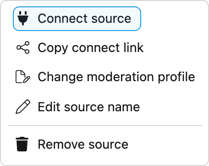
***Option 1** :* you are the user performing the connection. You can directly click on the options of the source you want to connect, and access 'connect source'.
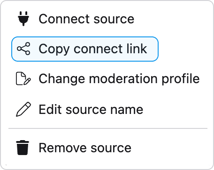
***Option 2** :* someone else performs the connection.
Click on the button below, and share the copied link to the person who will connect the source.
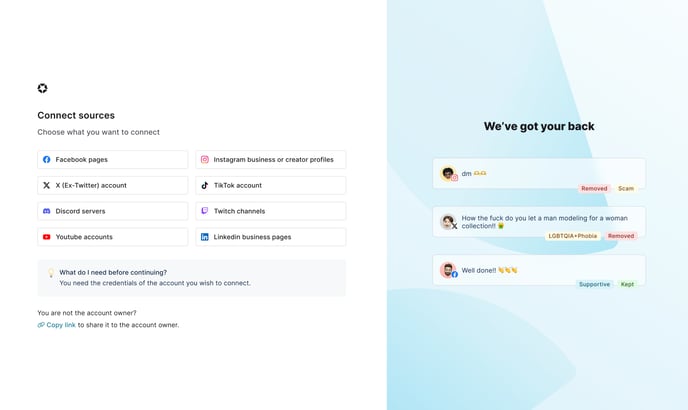
You will be redirected to this welcome page, where you can choose the type of source you want to connect.
### 3. Permissions
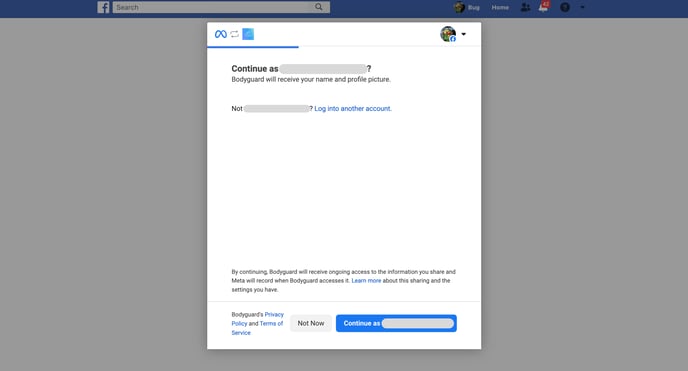
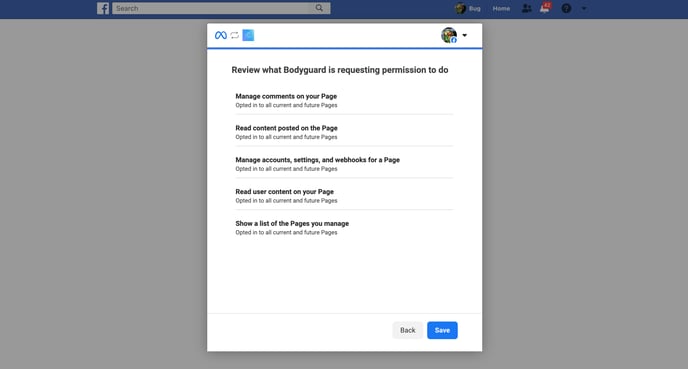
This is where the Facebook connection funnel starts. You will be asked to authorize Bodyguard to access specific information.

By proceeding, you will be redirected to Facebook:
Then asked to select the pages you allow Bodyguard to access:

And finally, grant access by saving your choice.
### 4. Page selection
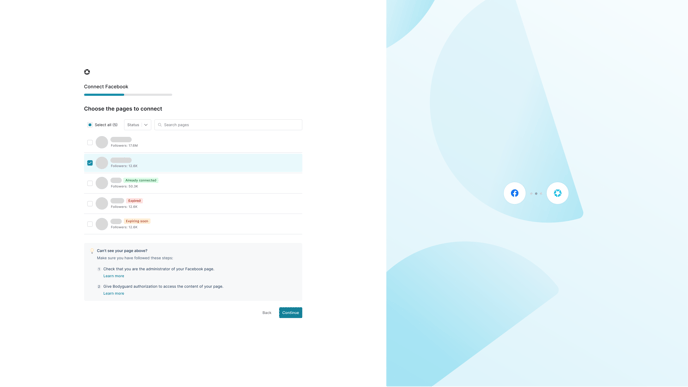
Back to Bodyguard interface, you will need to select the pages you want to monitor and protect:
### 5. Confirmation
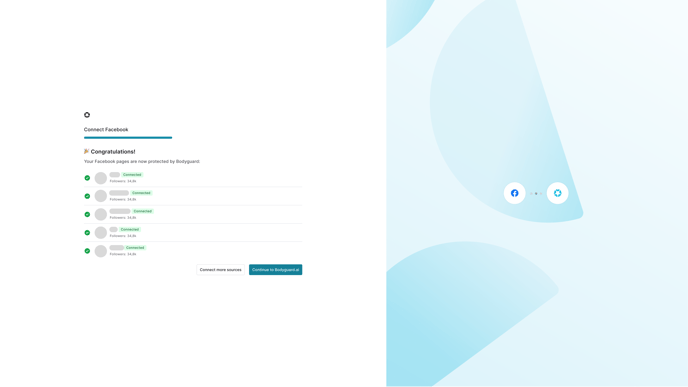
If any error occurs, you will get a pop-up message explaining the situation and the next steps. If not, you will be all done!
If you need any assistance or support during the connection of your sources, reach out to our Customer Success Team using [help@bodyguard.ai.](mailto:help@bodyguard.ai)
- [Connect to Bodyguard](https://help.bodyguard.ai/connect-to-bodyguard?hsLang=en#main-content)
- [Connect your social media](https://help.bodyguard.ai/connect-to-bodyguard?hsLang=en#connect-your-social-media)
- [Connect your own platform](https://help.bodyguard.ai/connect-to-bodyguard?hsLang=en#connect-your-own-platform)
- [Get started with Bodyguard](https://help.bodyguard.ai/get-started-with-bodyguard?hsLang=en#main-content)
- [Onboarding Guide: get started](https://help.bodyguard.ai/get-started-with-bodyguard?hsLang=en#onboarding-guide-get-started)
- [What is Bodyguard?](https://help.bodyguard.ai/get-started-with-bodyguard?hsLang=en#what-is-bodyguard)
- [Bodyguard Dashboard](https://help.bodyguard.ai/bodyguard-dashboard?hsLang=en)
- [Moderation by Bodyguard](https://help.bodyguard.ai/moderation-by-bodyguard?hsLang=en)
- [Advanced features](https://help.bodyguard.ai/advanced-features?hsLang=en)
- [Advanced use cases with Bodyguard](https://help.bodyguard.ai/advanced-use-cases-with-bodyguard?hsLang=en)
[](https://www.bodyguard.ai/fr)
[4-6 Chem. de l'Arénas Immeuble Unity, 06200 Nice](https://www.google.com/maps/place//data=!4m2!3m1!1s0x12cdc55b14fd6cdf:0x78a90f5bedce5d19?sa=X&ved=1t:8290&ictx=111)
[mailto:help@bodyguard.ai](mailto:help@bodyguard.ai)
Copyright © 2025, Bodyguard.ai