---
title: Dashboard - Authors
description: In this section, you can oversee all the authors who interact on your different corporate accounts.
---
[Skip to content](https://help.bodyguard.ai/dashboard-authors#main-content)
- [English](https://help.bodyguard.ai/dashboard-authors)
- [Français](https://help.bodyguard.ai/fr/dashboard-auteurs)
English
Show submenu for translations
[](https://help.bodyguard.ai/fr/knowledge?hsLang=en)
- [Visit Bodyguard.ai](https://www.bodyguard.ai/en)
Open main navigation
Close main navigation
- [Visit Bodyguard.ai](https://www.bodyguard.ai/en)
- - [English](https://help.bodyguard.ai/dashboard-authors)
- [Français](https://help.bodyguard.ai/fr/dashboard-auteurs)
English
Show submenu for translations
- [Contact us](mailto:help@bodyguard.ai)
[Contact us](mailto:help@bodyguard.ai)
How can we help you?
- There are no suggestions because the search field is empty.
1. [Help Center](https://help.bodyguard.ai/?hsLang=en)
2. [Bodyguard Dashboard](https://help.bodyguard.ai/bodyguard-dashboard?hsLang=en)
# Dashboard - Authors
## In this section, you can oversee all the authors who interact on your different corporate accounts.
This page provides you with information related to the authors who publish on your accounts and posts.
The overview allows you to quickly identify problematic behaviors and take instant actions. It also gives you the opportunity to pinpoint positive authors and increase engagement with them by making them your brand ambassadors.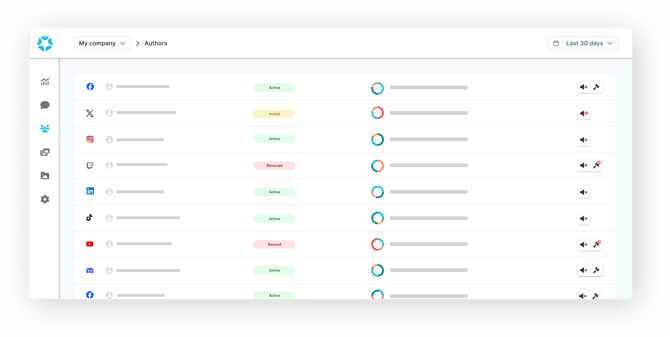
### Overall sections
- [Ranking](https://help.bodyguard.ai/dashboard-authors#ranking)
- [Search](https://help.bodyguard.ai/dashboard-authors#search)
- [Actions history](https://help.bodyguard.ai/dashboard-authors#history)
- [Upcoming actions](https://help.bodyguard.ai/dashboard-authors#upcoming)
The author page lists every author who posted at least 2 comments on the date range you set up. It articulates 3 different tabs: Ranking, Actions history and Upcoming actions that are detailed below.
### Ranking
The ranking tab is the entry point of the author page, which provides you with the list of authors to be sorted out or filtered by your preferences.
Select multiple authors or all authors displayed on the page to mute, unmute, ban or unban them simultaneously, temporarily or permanently.
**Time range**
**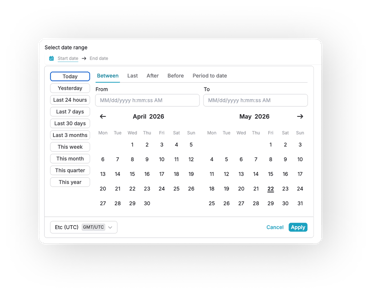**
Available on all main pages sits a date picker, allowing flexibility and precision. You can select from preset date ranges, as well as custom picks using:
- **Between:** pick two dates to retrieve authors from the start date to the end one.
- **Last:** select a volume and a temporality (hour, day, week, month...) and choose to include the current period or not.
- **After:** pick an exact date and retrieve authors from that precise time to now.
- **Before:** pick an exact date and retrieve authors until that precise time.
- **Period to date:** choose a time frame (day, week, month, quarter...) to retrieve authors on the range to now.
**By source**
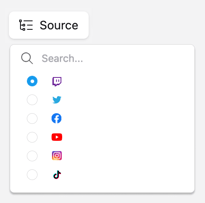
By clicking on the source button, you can filter authors by social network account.
**By username**
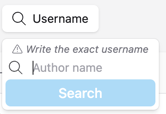
In order to identify a specific author, you can search for his or her exact username using our search bar.
Special characters (#, @, &, %, $ etc.) are not recognized and will not provide results.
**By sorting preferences**
**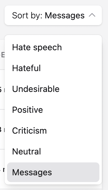**This block allows you to sort authors by categories or message count, based on their volume of messages and not the percentage.
#### Author information
For each author, you get these information:

- Type: the source of the author (social network account).
- Author: the username of the author.
- Status: whether the author is active or banned.
- Message statistics: the author message total with distributed analytics of his/her behavior on hover.
- Action: the possibility to ban, unban and mute an author by clicking on the ban hammer. Authors can be banned for one hour, one day, two days, one week, two weeks or permanently.
Ban blocks an author from posting content, while mute allows you to remove the messages from a specific author who will still appear as active.
The mute option is available through Bodyguard.ai technology, even on social platforms that do not offer it. It is available on all social platforms, except TikTok.
If you need more info, you can access the author advanced details by clicking on it.
**On the message tab, you will be able to have:**
**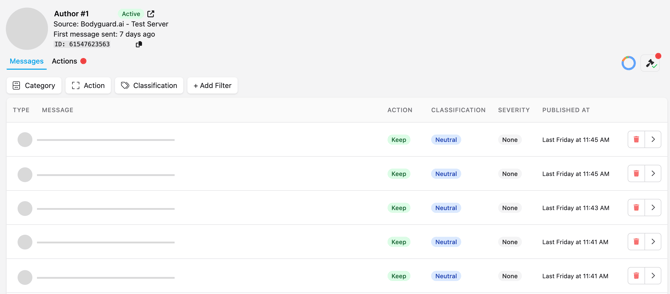**
- The date of his/her first message.
- His/her ID.
- The list of his/her messages to be filtered by category, action, classification, severity or the person or entity it is directed at. You can manually remove or retrieve some messages and check out the details.
- The possibility to translate any of the messages that is not in the language of your browser, by clicking on , and to reverse with .
The translation feature is part of the **Advanced plan**. If it is not displayed, [reach out to our Customer Success team](mailto:help@bodyguard.ai) to upgrade your plan.
**On the action tab, you will get:**
**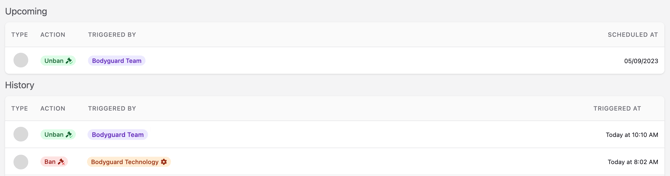**
- Upcoming actions: if the author was banned temporarily, the upcoming unban will appear there, with the user who triggered the action. Same with the mute action.
- Action history: all logs from ban/unban and mute/unmute actions that have been triggered and the user who triggered them.
Bodyguard technology can trigger automatic actions on authors based on thresholds you set up. To do so, [reach out to our Customer Success team.](mailto:help@bodyguard.ai)
### Search
**Search logic**
Our search allows you to combine keywords and phrases using logical operators to refine your results.
Only special characters covered are "@" and "#".
**Basic concepts**
- **Keywords**
Keywords are individual words matched **exactly**.
Multiple keywords are automatically combined with an **implicit AND**.
Example: `customer service` finds results containing both *customer* AND *service*.
- **Phrases**
Phrases are enclosed in double quotes (“”) and match an exact sequence of words.
Example: `“customer service”`
**Logical operators**
- **AND**
Finds results containing all specified keywords.
AND is applied **by default** between keywords.
Example: `apple AND orange` or `apple orange`
- **OR**
Finds results containing either one keyword or another.
Example: `apple OR orange`
**Grouping**
- **Parentheses**
Use `()` to control query logic.
Example: `(apple OR orange) AND banana`
- **Examples**
`coffee` → exact word match
`“black cat”` → exact phrase
`black coffee` → implicit AND
`cat OR dog` → either term
`(cat OR dog) AND nice` → combined logic
`“black cat” AND dog` → phrase + keyword
- **Error handling**
Invalid or incomplete queries return an error.
Ensure operators are placed correctly and all parentheses and quotes are closed.
Examples: `AND`, `word AND`, `)`, `cat AND (`, `”`
**Tips**
- Be specific
- Use quotes for exact phrases
- Add keywords to refine (implicit AND)
- Use OR to broaden
- Combine operators with parentheses
### Actions history
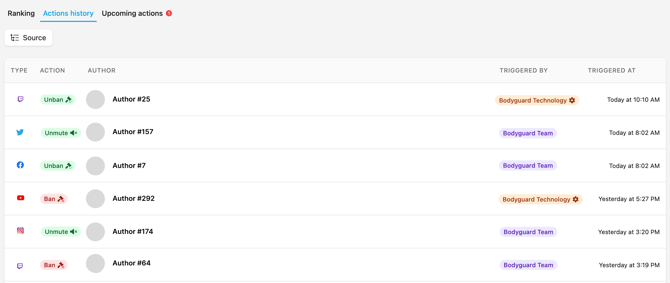
The actions history tab lists all actions that have been taken on your community with:
- the type of social network the action was taken on
- the action to ban, unban, mute and unmute
- the author concerned
- the user who triggered the action or  if it was automatic
- the date of the action
Automatic actions on authors (Bots, spam, toxic authors) based on thresholds of your choice can be enabled through our [Customer Success team](mailto:help@bodyguard.ai).
### Upcoming actions
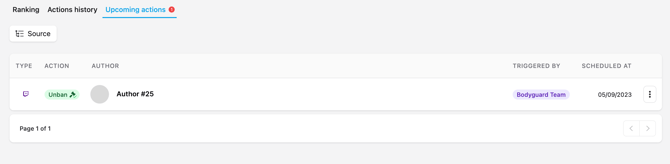
The upcoming actions tab is where you can find the action that will take place in the future. If you have decided to temporarily ban or mute a particular author, it will display the date this author will be unbanned or unmuted. It will also display who triggered the action (a user or Bodyguard.ai), when and on what social platform.
Automatic actions on authors (Bots, spam, toxic authors) based on thresholds of your choice can be enabled through our [Customer Success team](mailto:help@bodyguard.ai).
- [Connect to Bodyguard](https://help.bodyguard.ai/connect-to-bodyguard?hsLang=en#main-content)
- [Connect your social media](https://help.bodyguard.ai/connect-to-bodyguard?hsLang=en#connect-your-social-media)
- [Connect your own platform](https://help.bodyguard.ai/connect-to-bodyguard?hsLang=en#connect-your-own-platform)
- [Get started with Bodyguard](https://help.bodyguard.ai/get-started-with-bodyguard?hsLang=en#main-content)
- [Onboarding Guide: get started](https://help.bodyguard.ai/get-started-with-bodyguard?hsLang=en#onboarding-guide-get-started)
- [What is Bodyguard?](https://help.bodyguard.ai/get-started-with-bodyguard?hsLang=en#what-is-bodyguard)
- [Bodyguard Dashboard](https://help.bodyguard.ai/bodyguard-dashboard?hsLang=en)
- [Moderation by Bodyguard](https://help.bodyguard.ai/moderation-by-bodyguard?hsLang=en)
- [Advanced features](https://help.bodyguard.ai/advanced-features?hsLang=en)
- [Advanced use cases with Bodyguard](https://help.bodyguard.ai/advanced-use-cases-with-bodyguard?hsLang=en)
[](https://www.bodyguard.ai/fr)
[4-6 Chem. de l'Arénas Immeuble Unity, 06200 Nice](https://www.google.com/maps/place//data=!4m2!3m1!1s0x12cdc55b14fd6cdf:0x78a90f5bedce5d19?sa=X&ved=1t:8290&ictx=111)
[mailto:help@bodyguard.ai](mailto:help@bodyguard.ai)
Copyright © 2025, Bodyguard.ai