---
title: Dashboard - Messages
description: This section displays all the messages that have been analyzed by Bodyguard on the selected source(s) and date range.
---
[Skip to content](https://help.bodyguard.ai/dashboard-messages#main-content)
- [English](https://help.bodyguard.ai/dashboard-messages)
- [Français](https://help.bodyguard.ai/fr/dashboard-messages)
English
Show submenu for translations
[](https://help.bodyguard.ai/fr/knowledge?hsLang=en)
- [Visit Bodyguard.ai](https://www.bodyguard.ai/en)
Open main navigation
Close main navigation
- [Visit Bodyguard.ai](https://www.bodyguard.ai/en)
- - [English](https://help.bodyguard.ai/dashboard-messages)
- [Français](https://help.bodyguard.ai/fr/dashboard-messages)
English
Show submenu for translations
- [Contact us](mailto:help@bodyguard.ai)
[Contact us](mailto:help@bodyguard.ai)
How can we help you?
- There are no suggestions because the search field is empty.
1. [Help Center](https://help.bodyguard.ai/?hsLang=en)
2. [Bodyguard Dashboard](https://help.bodyguard.ai/bodyguard-dashboard?hsLang=en)
# Dashboard - Messages
## This section displays all the messages that have been analyzed by Bodyguard on the selected source(s) and date range.
The 'messages' page is the page allowing users to access all comments that have been posted on their account / page and posts. Users can use filters and search to easily find specific comments to take action or create their own reports.
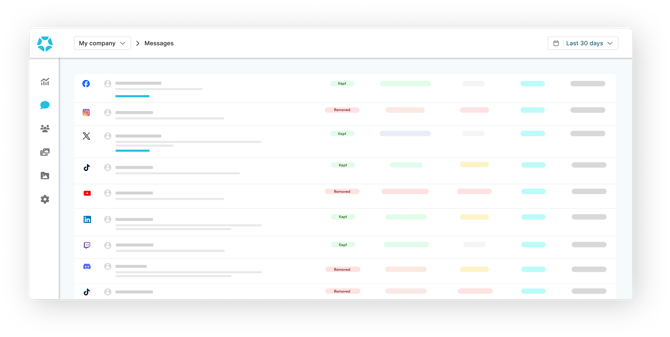
You can access it through the side menu, right below the [Analytics page](https://help.bodyguard.ai/knowledge/dashboard-analytics?hsLang=en), and above the [authors](https://help.bodyguard.ai/knowledge/dashboard-authors?hsLang=en), [posts](https://help.bodyguard.ai/knowledge/dashboard-posts?hsLang=en) and [settings](https://help.bodyguard.ai/knowledge/dashboard-general-settings?hsLang=en) pages.
### The Messages are displayed as follows:
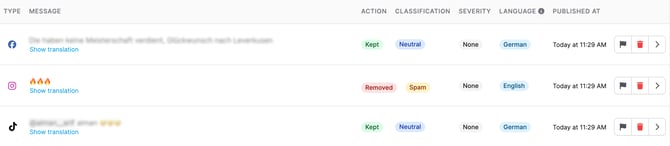
From here, you can access all messages posted on the social media sources that are protected by Bodyguard.
- [**The information on messages**](https://help.bodyguard.ai/dashboard-messages#information)
- [**The actions on messages**](https://help.bodyguard.ai/dashboard-messages#action)
- [**Message filtering**](https://help.bodyguard.ai/dashboard-messages#filter)
- [**Message search**](https://help.bodyguard.ai/dashboard-messages#search)
- [**Other actions**](https://help.bodyguard.ai/dashboard-messages#other)
### **The information on messages**
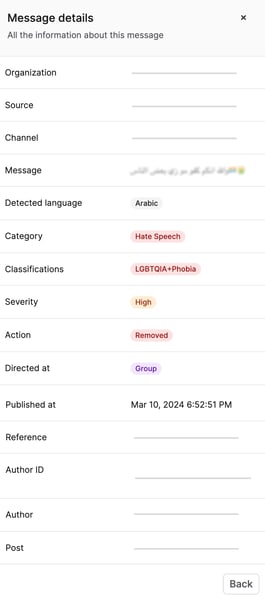
- **Source:** the social media platform the message was posted on.
- **Message:** the content of the comment.
- **Action:** whether the message was 'kept', 'removed', or 'flagged'.
- **Category**: type of classification (Hateful, Hate Speech, Positive,...)
- **Classification:** the content classification (see the [classification article](https://help.bodyguard.ai/knowledge/bodyguard-moderation-rules-guide?hsLang=en) for more details).
- **Classification method**: elements taken into account by the technology to take the decision.
- **Severity**: level of intensity of the message.
- **Language:** the language detected in the message.
- **Published at:** the time the message was posted at.
### **The actions on messages**
#### Message filtering
**Time range**
**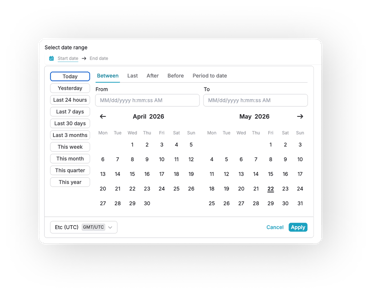**
Available on all main pages sits a date picker, allowing flexibility and precision. You can select from preset date ranges, as well as custom picks using:
- **Between:** pick two dates to retrieve comments from the start date to the end one.
- **Last:** select a volume and a temporality (hour, day, week, month...) and choose to include the current period or not.
- **After:** pick an exact date and retrieve comments from that precise time to now.
- **Before:** pick an exact date and retrieve comments until that precise time.
- **Period to date:** choose a time frame (day, week, month, quarter...) to retrieve comments on the range to now.
**Other filters**

- - **Source** (source type for social media platforms, source for a specific account)
- **Action** (removed, kept, flagged)
- **Classification**
- - **Category** (Criticism, Hate Speech, Hateful, Neutral, Positive, Undesirable)
- **Campaign** (if the post of the message is part of a campaign)
- - **Language**
- **Classification method** (whether the decision was influenced by specific rules)
- **Severity** (None, Low, Medium, High, Critical)
- **Directed at** (Author of comment, Entity, Everyone, Group, Haters, No one, single person, User, User's family)
- **Triggered by** (The person - user or Bodyguard moderator - or the technology that took the decision)
- **Reply** ('Yes' if you want to isolate replies to comments, 'No' if you only want comments to a post or a page / account)
You can select/combine one or more filters.
#### **Message search**
**Search logic**
Our search allows you to combine keywords and phrases using logical operators to refine your results.
Only special characters covered are "@" and "#".
**Basic concepts**
- **Keywords**
Keywords are individual words matched **exactly**.
Multiple keywords are automatically combined with an **implicit AND**.
Example: `customer service` finds results containing both *customer* AND *service*.
- **Phrases**
Phrases are enclosed in double quotes (“”) and match an exact sequence of words.
Example: `“customer service”`
**Logical operators**
- **AND**
Finds results containing all specified keywords.
AND is applied **by default** between keywords.
Example: `apple AND orange` or `apple orange`
- **OR**
Finds results containing either one keyword or another.
Example: `apple OR orange`
**Grouping**
- **Parentheses**
Use `()` to control query logic.
Example: `(apple OR orange) AND banana`
- **Examples**
`coffee` → exact word match
`“black cat”` → exact phrase
`black coffee` → implicit AND
`cat OR dog` → either term
`(cat OR dog) AND nice` → combined logic
`“black cat” AND dog` → phrase + keyword
- **Error handling**
Invalid or incomplete queries return an error.
Ensure operators are placed correctly and all parentheses and quotes are closed.
Examples: `AND`, `word AND`, `)`, `cat AND (`, `”`
**Tips**
- Be specific
- Use quotes for exact phrases
- Add keywords to refine (implicit AND)
- Use OR to broaden
- Combine operators with parentheses
#### Other actions
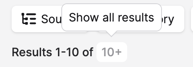
- **Evaluate volumes** with the results displayed at the top left of the page. By clicking on it, you get the number of results and you can measure reach and calculate shares using filters and search.
****
**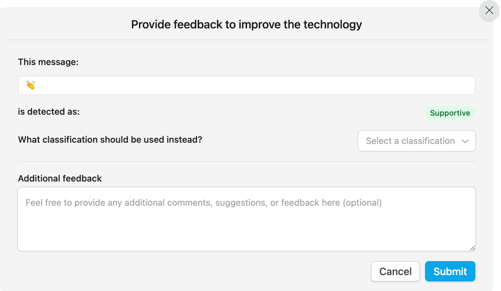Click on the chevron** to
-  **Report a mistake**: if you think the classification is not the right one, you can specify the which one should be assigned and it will directly apply.
-  **Remove a message** that has been kept
- ** Restore a message** that has been removed
Select multiple messages or all messages displayed on the page to remove or restore them in a single action.
- ** See the message details**:
- **Select** the number of messages to be displayed per page (10, 50, 100) and change pages.

- **Translate a message**
The translation feature is available through the **Advanced plan only**. If you're interested, reach out to our [Customer Success](mailto:help@bodyguard.ai) team to enable it.
By clicking on this link on a message, you can easily translate the text.
To reverse the translation, just click on "show original".
**Reminder**: you can find [here](https://help.bodyguard.ai/knowledge/social-networks-integration?hsLang=en) all possible actions on each social media.
- [Connect to Bodyguard](https://help.bodyguard.ai/connect-to-bodyguard?hsLang=en#main-content)
- [Connect your social media](https://help.bodyguard.ai/connect-to-bodyguard?hsLang=en#connect-your-social-media)
- [Connect your own platform](https://help.bodyguard.ai/connect-to-bodyguard?hsLang=en#connect-your-own-platform)
- [Get started with Bodyguard](https://help.bodyguard.ai/get-started-with-bodyguard?hsLang=en#main-content)
- [Onboarding Guide: get started](https://help.bodyguard.ai/get-started-with-bodyguard?hsLang=en#onboarding-guide-get-started)
- [What is Bodyguard?](https://help.bodyguard.ai/get-started-with-bodyguard?hsLang=en#what-is-bodyguard)
- [Bodyguard Dashboard](https://help.bodyguard.ai/bodyguard-dashboard?hsLang=en)
- [Moderation by Bodyguard](https://help.bodyguard.ai/moderation-by-bodyguard?hsLang=en)
- [Advanced features](https://help.bodyguard.ai/advanced-features?hsLang=en)
- [Advanced use cases with Bodyguard](https://help.bodyguard.ai/advanced-use-cases-with-bodyguard?hsLang=en)
[](https://www.bodyguard.ai/fr)
[4-6 Chem. de l'Arénas Immeuble Unity, 06200 Nice](https://www.google.com/maps/place//data=!4m2!3m1!1s0x12cdc55b14fd6cdf:0x78a90f5bedce5d19?sa=X&ved=1t:8290&ictx=111)
[mailto:help@bodyguard.ai](mailto:help@bodyguard.ai)
Copyright © 2025, Bodyguard.ai